
As businesses adopt more cloud applications, managing user access securely has become increasingly complex. Employees today use dozens of applications for communication, collaboration, development, HR, finance, and customer management. This creates a major challenge for IT teams: balancing security with a seamless user experience.
To solve this problem, organizations typically evaluate two technologies: Single Sign-On (SSO) and password managers.
In this guide, we’ll cover:
- What SSO is and how it works
- What a password manager does
- The key differences between password managers and SSO
- When businesses should use SSO, password managers, or both
- How miniOrange combines SSO and password management into a unified identity platform
What is Single Sign-On (SSO)?
Single Sign-On or SSO solution is an authentication method that allows users to access multiple applications using one login session and one set of credentials.
Instead of signing into every application individually, users authenticate once through a centralized identity provider and gain secure access to connected systems without repeated login prompts.
As organizations expand their SaaS environments, SSO has become a foundational part of modern Identity and Access Management (IAM).
How Does SSO Work?
To understand how SSO works, it’s important to understand two key components:
Identity Provider (IdP)
The Identity Provider authenticates the user and manages identity verification.
Examples include:
- miniOrange
- Okta
- Microsoft Entra ID
- Google Workspace
Service Provider (SP)
The Service Provider is the application the user wants to access.
Examples include:
- Salesforce
- AWS
- Jira
- Dropbox
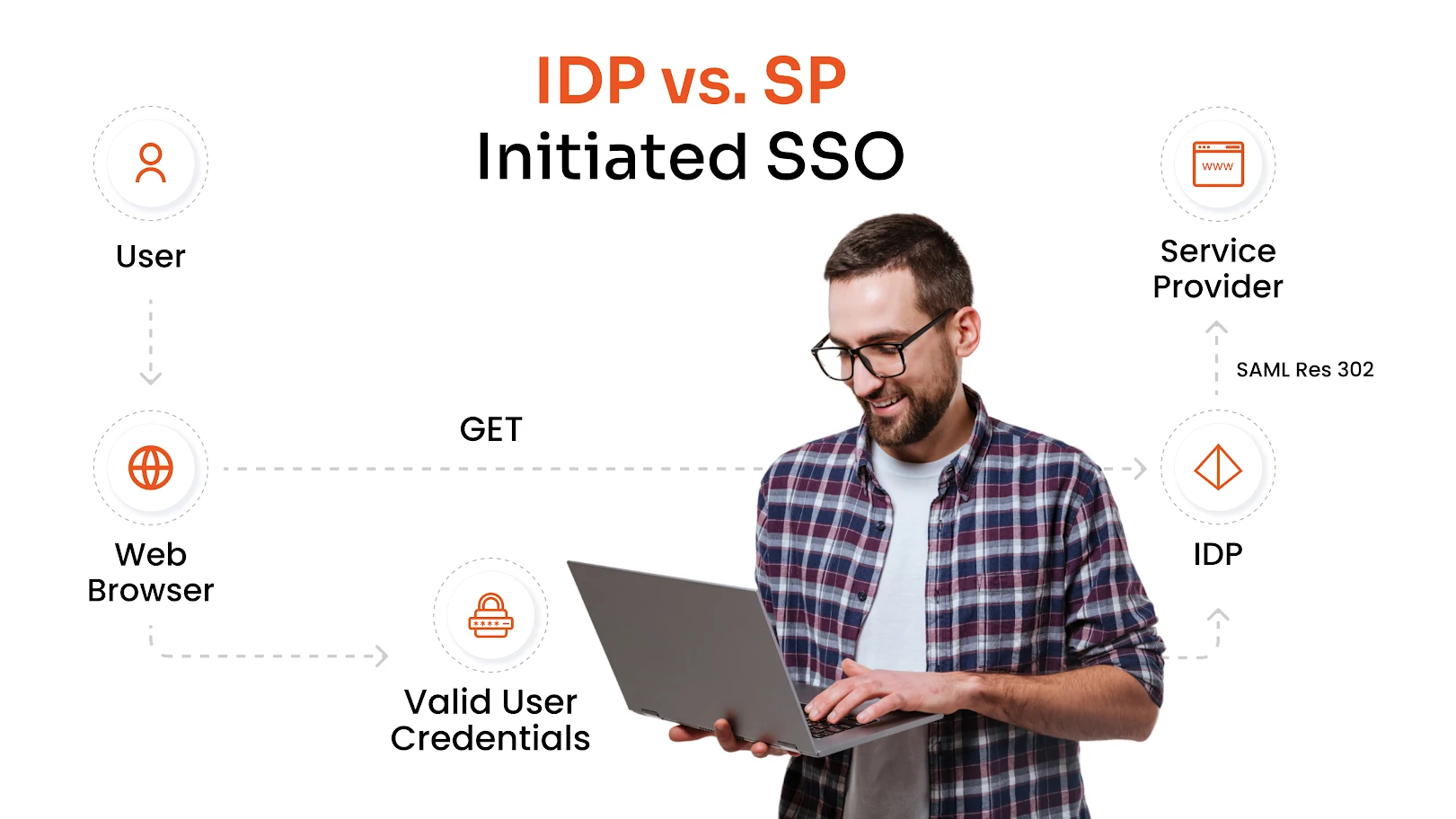
SSO Authentication Flow
A typical SSO authentication process works like this:
1. A user tries to access an application
2. The application redirects the user to the Identity Provider
3. The Identity Provider verifies the user's credentials
4. Authentication is completed using secure protocols
5. The user is granted access to the application without another login
This centralized authentication model reduces password dependency across applications while simplifying user access.
Common SSO Protocols
Modern SSO solutions rely on secure authentication protocols such as:
Security Assertion Markup Language
Widely used for enterprise application authentication.
OAuth
Primarily used for authorization and delegated access.
OpenID Connect (OIDC)
An identity layer built on OAuth 2.0 for modern web and mobile applications.
These SSO protocols allow organizations to connect users, applications, and identity systems securely.
Benefits of Single Sign-On
SSO offers significant operational and security advantages for businesses by simplifying authentication across applications.
Reduced Password Fatigue
Users only need to remember one primary credential instead of dozens of passwords, reducing login frustration and minimizing risky behaviors like password reuse or weak passwords.
Improved Productivity
Employees spend less time logging into separate applications, resetting forgotten passwords, or managing credentials, allowing them to focus more on daily business operations.
Centralized Access Management
IT teams can manage application access, authentication policies, and user permissions from a single centralized platform across cloud and on-premise environments.
Faster User Provisioning
Administrators can quickly onboard or offboard employees across connected applications, reducing manual provisioning efforts and minimizing risks from lingering access permissions.
What is a Password Manager?
A password manager is a tool that helps users securely store, generate, and manage passwords for multiple applications and accounts.
Instead of remembering every password manually, users save credentials inside an encrypted password vault protected by a master password or authentication method.
Password management is commonly used to improve password hygiene and reduce weak password usage.
How Does a Password Manager Work?
Password managers store credentials in an encrypted vault and help users access applications more easily through features like:
- Password autofill
- Password generation
- Secure credential storage
- Cross-device synchronization
Most password managers also help users create strong and unique passwords for every account.
Password Autofill
Password managers automatically fill login credentials for websites and applications, helping users access accounts quickly while reducing repetitive manual logins and typing errors.
Password Generation
Most password managers generate strong, unique, and randomized passwords for every account, improving security and reducing the risk of password reuse across platforms.
Secure Credential Storage
Credentials are stored inside encrypted password vaults that protect sensitive login information from unauthorized access, credential theft, and accidental exposure.
Cross-Device Synchronization
Cloud-enabled password managers synchronize credentials securely across desktops, laptops, tablets, and smartphones, ensuring users can access passwords from any approved device.
Most password managers also help users create strong and unique passwords for every account.
Types of Password Managers
Browser-Based Password Managers
Built directly into browsers like Chrome or Edge, these password managers offer basic credential storage and autofill capabilities for everyday web access.
Cloud-Based Password Managers
Cloud-based password managers securely store encrypted credentials online and synchronize passwords across multiple devices for easier remote access and management.
Enterprise Password Managers
Enterprise password managers provide centralized administrative controls, credential sharing, auditing, policy enforcement, and team-based password management for organizations.
Local Password Managers
Local password managers store credentials directly on user devices rather than in the cloud, offering greater offline control over password storage and access.
Password Manager Benefits
Password managers help improve security by:
- Reducing password reuse
- Encouraging strong password creation
- Simplifying login management
- Protecting stored credentials
- Improving password hygiene
However, password managers still rely heavily on passwords themselves, which can create management and visibility limitations at enterprise scale.
Password Manager vs SSO: Key Differences
Although both technologies improve login experiences, there are major differences between SSO and password managers.
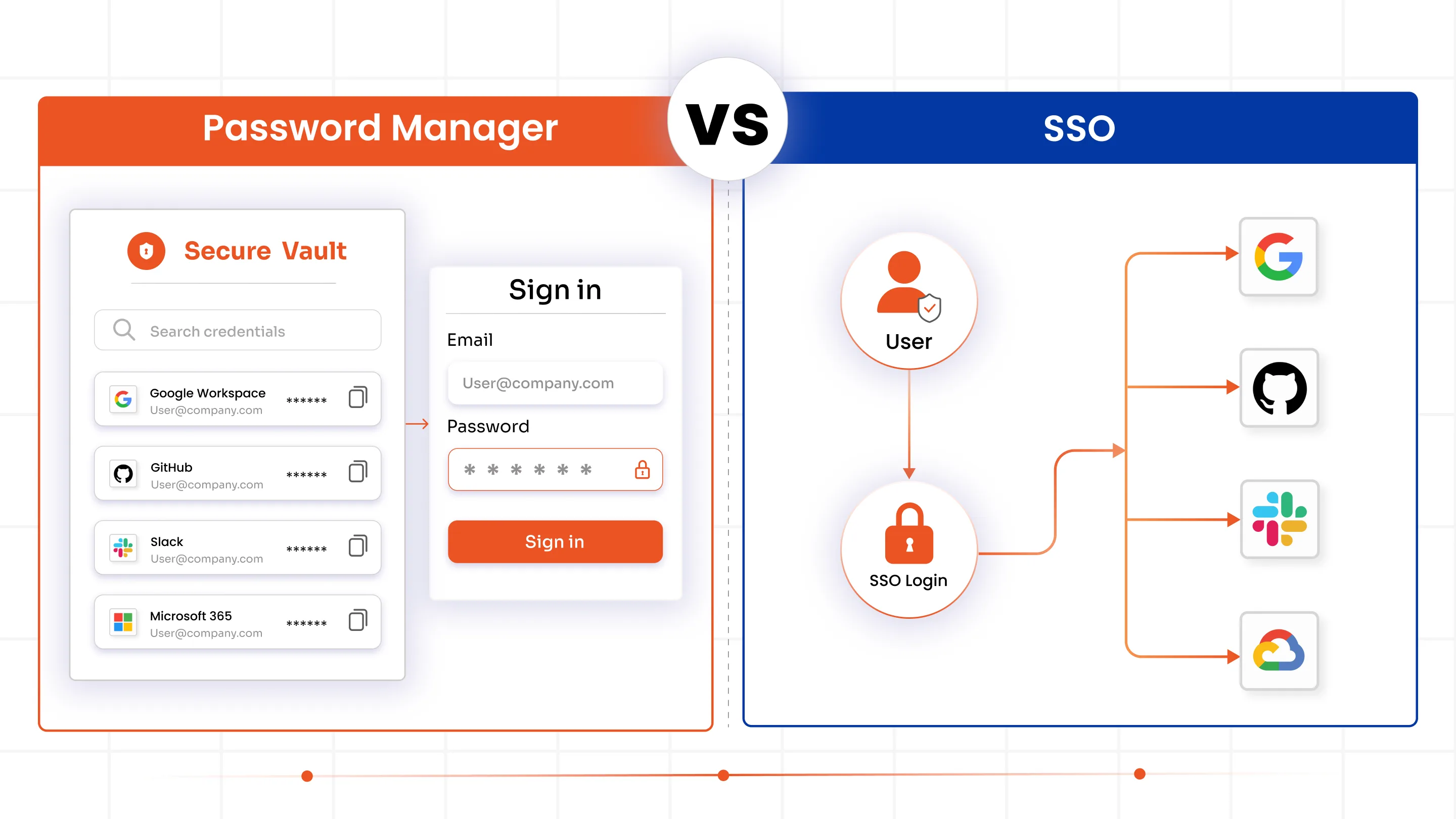
| Feature | SSO (Single Sign-On) | Password Manager |
|---|---|---|
| Primary Purpose | Centralizes authentication and allows users to access multiple applications using one login session. | Securely stores, organizes, and manages passwords for different accounts and applications. |
| Login Experience | Users authenticate once and gain seamless access to connected applications without repeated logins. | Users still log into each application individually, although autofill simplifies the process. |
| Password Dependency | Reduces reliance on passwords across applications by using centralized authentication sessions. | Still heavily dependent on passwords since credentials are stored and reused for application access. |
| Authentication Method | Uses centralized identity verification through protocols like SAML, OAuth, and OpenID Connect. | Uses stored credentials to authenticate users directly into websites and applications. |
| Access Management | Provides centralized access control, role management, and authentication policy enforcement across systems. | Primarily focuses on password storage with limited centralized access governance capabilities. |
| User Provisioning | Supports automated onboarding, offboarding, and role-based provisioning across integrated applications. | Generally does not support full identity lifecycle management or automated user provisioning. |
| Security Controls | Enables MFA, conditional access policies, session management, and centralized authentication monitoring. | Improves password hygiene through password generation, encryption, and secure credential storage. |
| Compliance and Auditing | Offers centralized logging, authentication tracking, audit reporting, and compliance visibility for enterprises. | Provides basic password auditing and security alerts, but limited enterprise governance visibility. |
Which Should You Use: SSO, Password Manager, or Both?
The right solution depends on your organization’s size, application ecosystem, security maturity, and operational requirements. While both SSO and password managers improve login security and user convenience, they serve different purposes within an identity security strategy.
For modern businesses managing growing SaaS environments, remote workforces, and compliance requirements, SSO often becomes the foundation for centralized authentication and access control. However, password managers still play an important supporting role, especially for applications and systems that cannot integrate directly with SSO.
When SSO Makes the Most Sense
- Centralized authentication: SSO is ideal for organizations using multiple cloud and SaaS applications because it reduces repeated login prompts across systems.
- Remote and hybrid workforce security: Businesses benefit from centralized access management, MFA software, and seamless user access across distributed environments.
- Automated identity management: SSO helps IT teams streamline provisioning, deprovisioning, compliance reporting, and authentication visibility from one platform.
- Scalable access control: As organizations grow, SSO becomes essential for reducing password sprawl and simplifying access management across large application ecosystems.
When a Password Manager Makes Sense
- Secure credential storage: Password managers are useful for applications that do not support SSO or modern federation protocols.
- Improved password hygiene: Smaller organizations often use password managers to generate strong passwords and reduce password reuse risks.
- Secure credential sharing: Teams can safely manage shared administrative accounts, third-party credentials, and external platform logins.
- Password-based application support: Password managers help secure legacy systems and external applications that still rely on traditional username-password authentication.
Why Many Enterprises Use Both
- Legacy application support: Even organizations with mature SSO deployments still manage systems and vendor portals requiring password-based authentication.
- Layered identity security: Enterprises combine SSO for centralized authentication with password managers for secure credential storage across unsupported applications.
- Better user experience and security: Using both technologies together reduces password fatigue while improving MFA enforcement and password hygiene.
- Balanced enterprise access management: This hybrid approach helps organizations improve usability, scalability, compliance visibility, and identity security across modern environments.
How miniOrange Combines SSO and Password Management
miniOrange provides a unified Identity and Access Management (IAM) platform that combines Single Sign-On (SSO), password management, adaptive MFA, and lifecycle management into one centralized solution.
Centralized Authentication and SSO
miniOrange enables organizations to implement Single Sign-On across cloud applications, VPNs, legacy systems, custom applications, and on-premise environments using protocols like SAML, OAuth, OpenID Connect, LDAP, and Active Directory integrations.
This centralized authentication approach reduces password fatigue, simplifies application access, improves user experience, and strengthens enterprise-wide access management and authentication security.
Password Management and Secure Vaults
miniOrange includes secure password management capabilities that help organizations protect credentials across both SSO-enabled and non-SSO applications.
Features such as encrypted password vaults, password autofill, credential sharing, and password policy enforcement improve password hygiene while reducing credential-related risks and simplifying secure access management across enterprise applications and user environments.
Adaptive MFA and Identity Security
The platform integrates adaptive Multi-Factor Authentication with SSO and password management workflows to strengthen identity security across modern enterprise environments.
Organizations can enforce risk-based authentication, location-aware policies, device-based access restrictions, and passwordless authentication methods to reduce unauthorized access risks while securing remote, hybrid, and distributed workforce authentication processes.
User Provisioning and Lifecycle Management
miniOrange supports automated onboarding, role-based provisioning, user management, and directory synchronization to simplify identity lifecycle management across connected systems and applications.
IT teams can centrally manage user access, automate identity workflows, reduce manual administrative effort, and improve governance visibility while strengthening compliance and reducing risks associated with excessive or outdated user permissions.
FAQ
What is the difference between SSO and a password manager?
SSO centralizes authentication and allows users to access multiple applications using one login session. Password managers securely store and manage passwords for different accounts and applications.
Is SSO a password manager?
No. SSO focuses on authentication and centralized access management, while password managers focus on securely storing credentials.
Do I need a password manager if I have SSO?
In many cases, yes. Some applications may not support SSO, and password managers help secure credentials for those systems.
Can businesses use SSO and password managers together?
Yes. Many organizations combine SSO with password management to improve security, simplify access, and manage both federated and non-federated applications.
How does SSO improve security?
SSO improves security by centralizing authentication, reducing password sprawl, enabling MFA enforcement, and simplifying access governance.
What does a password manager do?
A password manager securely stores, generates, and autofills passwords while helping users maintain stronger password hygiene.

Leave a Comment